
Trenitalia
Trenitalia S.p.AMaps & Navigation
3.4144.00 Reviews
- Version
- 13.500.0
- Installs
- 10.00M
- Age Rating
- Everyone
Screenshots
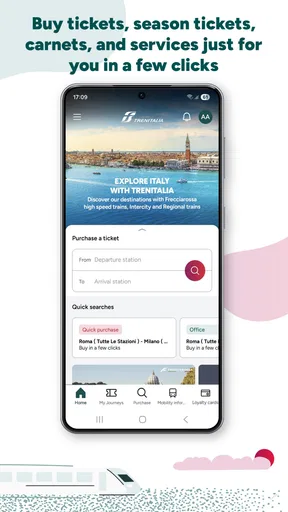
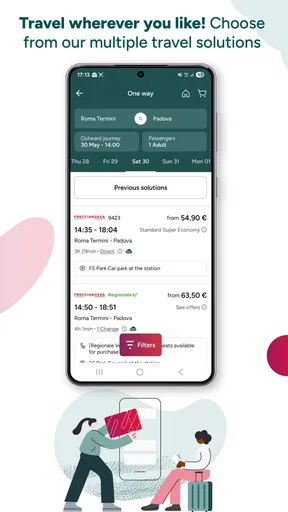
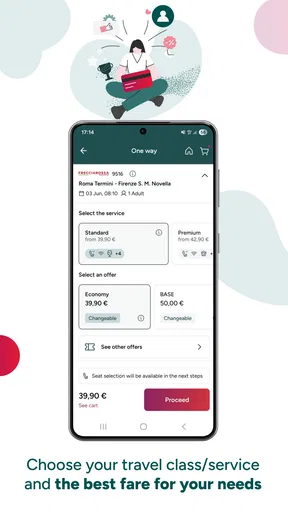
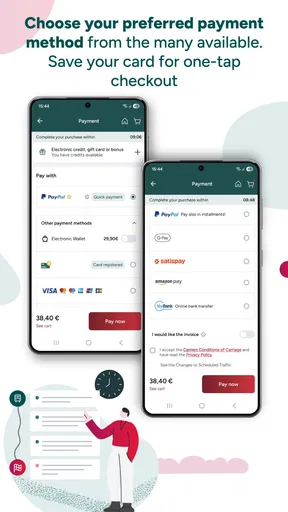
Our Review of Trenitalia
 Analysis by Appyee
I found the Trenitalia app most useful when I treated it as a practical companion for planning a rail journey rather than as a complete replacement for every travel tool. Developed by Trenitalia S.p.A, this free Maps & Navigation app puts the railway operator’s own information close at hand, which can be reassuring when I need to check a journey connected to Trenitalia services. Its store summary invites users to discover the new app, but the real question is whether it is comfortable and understandable for people with different abilities, devices, routines, and levels of confidence with travel apps.
My overall impression is mixed but positive. The app has a clear purpose and belongs on the phone of someone who regularly travels by train, especially when that person wants to work directly with the operator’s own journey information. At the same time, a transport app is only truly useful if people can read it under pressure, operate it with limited dexterity, understand changes quickly, and use it in noisy stations or weak-signal situations. Trenitalia makes a reasonable everyday tool, but I would still keep a second way to check essential journey details.
How Trenitalia works for different users and travel situations
I look at how different passengers can make the app fit their own routines, from someone planning a first rail trip to a commuter checking a familiar route. A useful approach is to decide in advance which details you personally need at the station, so you can keep the important information easy to find without repeating the whole planning process.
Readable navigation for planning a journey
The app’s strongest accessibility quality is its focused subject matter. It is not trying to be a general map, a social platform, or a large travel marketplace. When I open it with a rail journey in mind, the purpose is immediately more manageable: I am looking for a connection, checking travel information, or preparing for a trip. That narrower scope can reduce the mental effort required from someone who finds broad, crowded apps tiring to navigate.
I also appreciate the value of an official railway app for people who dislike comparing several sources. A general map service may be excellent for walking directions and broad transport planning, while a ticket marketplace may be convenient for comparing operators. However, those alternatives can add layers of information that are not useful once I already know I want a Trenitalia journey. The operator’s own app is more directly relevant at that point.
That does not mean every screen will feel equally simple. Travel apps often present several decisions close together: departure and arrival, dates, times, passenger details, and journey choices. For a user with dyslexia, attention difficulties, or limited experience with digital booking, the challenge is not only the size of the text. It is also whether labels are predictable, whether the current selection is obvious, and whether a mistake can be corrected without starting again.
My practical advice is to prepare a journey before leaving home rather than trying to make every decision while standing on a platform. Enter the route slowly, review the selected date and time, and pause before confirming anything important. This is especially helpful for users who need extra time to read, users who rely on magnification, and anyone who becomes overwhelmed by station noise or a crowded interface.
The app has been available since May 17, 2018, and its current version is 13.500.0. Those details matter less than the day-to-day experience, but they show that this is an established product rather than a newly launched experiment. It supports Android 7.0 and later, which gives it a broad reach among Android users, including people who keep an older phone because replacing a device is difficult or expensive.
Motor and sensory considerations that affect real use
For people with limited hand movement, tremors, or pain, the most important issue is how much precise tapping and repeated typing a journey requires. A rail trip can involve several stages of interaction, and small controls become more difficult when I am using the app one-handed, carrying luggage, or holding onto a handrail. I would not plan an urgent connection while walking through a station. I would stop somewhere stable, use both hands if possible, and complete one step at a time.
Voice input offered by the phone itself may help users who find typing difficult, although that is a device-level aid rather than something I would treat as a special Trenitalia feature. It can reduce the effort of entering station names, but spoken input is not always reliable with unusual place names, background noise, or an accent. I would always visually check the result because a similar-looking station can lead to a serious travel mistake.
Users with low vision may benefit from adjusting the phone’s text size, display contrast, or magnification, provided the app remains usable with those system settings. I would test this at home before relying on it for a trip. Enlarging text can make reading easier, but it can also cause more scrolling or make a dense screen feel less complete at a glance. The best setting is the one that lets the user read the important journey details without losing the surrounding context.
For blind users or people who navigate primarily with a screen reader, I would be more cautious. A transport app needs every control, result, date, and status message to be announced in a logical order. It also needs changes to be communicated clearly rather than appearing only through visual layout. I cannot recommend assuming that every part of the experience will be equally comfortable with assistive technology. Testing the route-search and confirmation steps before travel is the sensible approach.
People with hearing loss may prefer information that is visible rather than dependent on announcements. An app can be particularly useful in that situation because written journey details are easier to revisit than a platform announcement heard once. Still, I would not use the app as the only source during a disruption. Station displays, staff, and other official notices may carry urgent information that needs attention even when the phone is muted or out of battery.
Users with sensory sensitivities may find a quieter planning routine more comfortable than interacting with the app in a crowded concourse. I would prepare the route, save or note the key details in a way that suits my routine, and keep the phone accessible without repeatedly reopening screens. The goal is to reduce the number of decisions required in the most stressful part of the journey.
Situational access: when the app helps most
A realistic example is a passenger travelling to an appointment in another city. At home, the passenger can search the route, inspect the departure options, and make sure the chosen date is correct. Before leaving, they can write down the departure time and destination or keep the relevant screen ready. At the station, they are not forced to perform a full search while carrying a bag, navigating a ramp, and listening for announcements.
This preparation-first workflow is one of my most useful recommendations for Trenitalia. It helps people with mobility limitations because they can avoid unnecessary movement between information points. It helps people with anxiety because the journey becomes a sequence of smaller checks. It also helps anyone travelling with children, luggage, or a companion who needs assistance.
The app can also be useful for a family member supporting another passenger remotely. One person may handle the planning while the traveller keeps the essential details available on their own phone. That arrangement is not a substitute for the traveller understanding the route, but it can provide a second layer of confidence when the journey is unfamiliar.
For frequent commuters, the value is different. A commuter may already know the route and use the app mainly when the usual plan changes. In that case, speed matters more than exploration. I would avoid entering unnecessary information and focus on checking the affected part of the trip. A familiar routine makes the app less demanding, but it also creates a risk: I might assume that a usual departure is unchanged without carefully reading the current result.
Travellers with limited data access or unreliable connectivity should prepare before they reach the station. I would not assume that every important part of the journey will remain available in exactly the same form without a connection. Keeping the departure, destination, and key timing details somewhere accessible offline is a sensible backup, especially for a long trip or a journey involving several changes.
People who use older Android devices may appreciate the minimum operating-system requirement of Android 7.0. The app is free, so the initial decision is easier for users who need to manage travel costs carefully. Free access does not remove the cost of the journey itself, of course, and I would still review the final travel choices attentively before confirming anything.
Where the experience still creates barriers
The biggest barrier is the consequence of a small mistake. Selecting the wrong station, date, or direction is not like choosing the wrong result in a casual search; it can mean missing an appointment or needing help in an unfamiliar place. This is why I value clear confirmation more than visual decoration. Users who read slowly should have enough time to verify the important details, and users who depend on assistive technology need those details exposed in a meaningful order.
Another barrier is the gap between digital information and the physical station. Even a well-prepared app user may still need to find a platform, identify a carriage, manage stairs or lifts, and respond to a last-minute announcement. The phone cannot remove those environmental obstacles. Someone with reduced mobility should plan the station itself, not only the route shown on the screen, and should seek human assistance when the physical layout becomes difficult.
Battery life is also an accessibility issue. A phone used for navigation, communication, and assistance is a critical tool for many travellers. I would charge it before departure, lower unnecessary battery use, and carry the essential journey information in another form. This is not a criticism unique to Trenitalia; it is a general weakness of relying on a phone during travel. Still, an app review should acknowledge that digital convenience depends on the device remaining usable.
Language and confidence can create additional friction. A person who is unfamiliar with railway vocabulary may understand the station names but still struggle with the difference between a departure choice, a connection, and a final destination. I would recommend planning with a trusted companion for a first journey, then repeating the same workflow independently once the person is comfortable. That gradual approach is more realistic than assuming every user will understand the interface immediately.
The average rating is 3.4 from around 75 thousand ratings, while the app has more than ten million installs. I read that combination as a sign of a widely used tool with a noticeable range of experiences rather than as a simple verdict. A large audience includes older devices, different accessibility needs, varied network conditions, and both occasional and frequent travellers. I would judge the app against my own route and device instead of treating the average as a guarantee.
How it compares with usual alternatives
Compared with a general mapping app, Trenitalia is the more natural choice when my journey depends specifically on the railway operator. A mapping app may be better for the walk to the station, finding a nearby entrance, or combining rail with other local transport. I would use the two types of tools together rather than expecting one to handle every part of the trip equally well.
Compared with third-party rail planners, the official app has the advantage of being directly tied to Trenitalia’s own travel environment. That can make it the first place I check when I want operator-specific information. A third-party service may still be preferable for comparing multiple railway companies, building a complicated cross-operator itinerary, or viewing a broader transport network in one place.
Compared with paper notes or a screenshot, the app is more flexible when I need to search again or review a different option. Paper and screenshots are stronger as backups because they do not depend on battery, signal, or remembering where a detail appeared. For an accessibility-conscious journey, I would combine them: use the app for planning, then keep the most important information available in a low-effort backup.
I would skip relying on Trenitalia alone if I needed a fully accessible journey-planning experience that had already been tested against my particular screen reader, enlarged display, switch-control setup, or motor limitations. In that situation, I would test the app early, involve a companion or support person, and keep another information source ready. The app may still be useful, but it should not be the only link in the chain.
My inclusive verdict
Trenitalia is a worthwhile free app for people who travel on the operator’s trains and want a direct way to prepare their journeys. It is suitable for Everyone, and its focused purpose can make rail planning less intimidating than using a broad collection of travel services. I especially like it for the preparation stage: searching calmly at home, checking the route, and reducing the amount of work required in a busy station.
Its accessibility value is practical rather than absolute. The app can support users with different needs when combined with phone settings, careful preparation, a backup note, and help from station staff when physical access becomes the real challenge. I would not promise the same experience for every screen reader, enlarged layout, older device, or stressful travel situation without testing it first.
My recommendation is therefore straightforward: install it if Trenitalia is part of your regular travel, but build a personal routine around it. Check the route before leaving, verify every important selection, prepare for weak connectivity, and keep essential details available outside the app. With those habits, the app becomes a useful travel aid rather than a single point of failure. For my own trips, that balance makes Trenitalia helpful, while its remaining barriers keep it from being the only travel tool I would trust.
In short, Trenitalia is best for passengers who want operator-focused rail planning and are willing to prepare thoughtfully. It is less suitable for anyone seeking one universal app for walking directions, every transport provider, and guaranteed assistive-technology comfort. Trenitalia S.p.A has created a practical starting point, but inclusive travel still depends on the surrounding station, the phone being usable, and the passenger having a backup plan.
Verdict
Strengths of Trenitalia
- Official schedules, fares, and train updates in one app.
- Digital ticket purchasing reduces the need to visit ticket machines.
- Supports multiple payment methods, including cards and digital wallets.
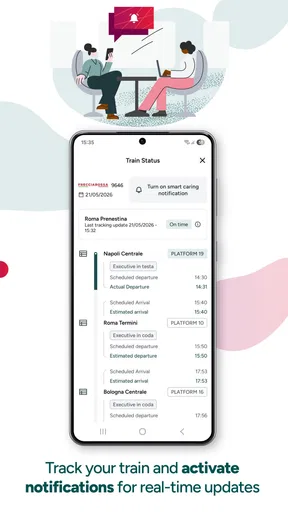
- Useful for checking platform information and journey changes.
- Loyalty features can benefit frequent Trenitalia travelers.
Limitations of Trenitalia
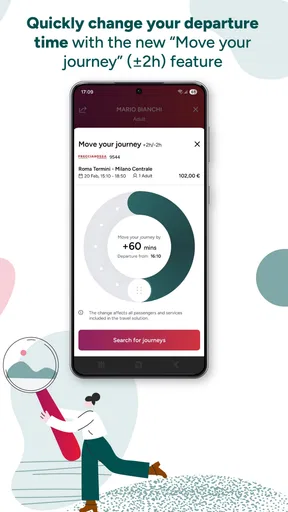
- Some users may find the interface confusing when planning complex trips.
- Ticket changes and refunds can depend on restrictive fare conditions.
- Real-time updates may be delayed during disruptions or busy periods.
- Certain regional routes may offer limited booking or service details.
- An account may be required for some purchases and personalized features.
Similar Picks in This Category
View All
Uber - Request a ride
Uber Technologies, Inc.4.7


inDrive. Rides with fair fares
® SUOL INNOVATIONS LTD4.8

Yandex Go: Taxi Food Delivery
Mikromobilnost LLC Belgrade4.8

Bolt: Request a Ride
Bolt Technology4.8

Rapido: Bike-Taxi, Auto & Cabs
Rapido Bike Taxi4.8
You May Also Like
View All
Frequently Asked Questions
What is the Trenitalia app used for?
The Trenitalia app is the official mobile tool for planning journeys and managing train travel in Italy. You can search routes, compare available services, check departure and arrival times, view fares, and purchase tickets for many Trenitalia services. It is particularly useful for checking travel information while away from a computer, although available features may vary depending on the route and ticket type.
Can I buy Trenitalia tickets directly in the app?
Yes, the app allows users to search for eligible journeys and purchase many train tickets directly from a smartphone. Depending on the service, you may be able to select a fare, enter passenger details, complete payment, and receive a digital ticket or booking confirmation. Before traveling, carefully check the ticket conditions, validity rules, and whether identification is required.
Does the Trenitalia app show live train updates and platform information?
The app can provide journey information such as scheduled departure and arrival times, train status, delays, cancellations, and other service notices when data is available. Platform information may also be displayed, but it should not be treated as guaranteed until confirmed at the station. For important trips, we recommend checking the app again shortly before departure and listening for station announcements.
Which Trenitalia trains and services can I find through the app?
The app is designed to support a broad range of Trenitalia travel options, including high-speed Frecce trains, Intercity services, and many regional routes. The exact availability of schedules, fares, seat selection, and digital tickets can differ by train type, region, and itinerary. If a connection does not appear, verify the stations, date, and time or check whether another booking channel is required.
Is the Trenitalia app free, and what should I know before downloading it?
Downloading the Trenitalia app is generally free, but purchasing a ticket through it still costs the applicable fare, and some payment or booking conditions may apply. An internet connection is needed for searches, purchases, and updates, while mobile data charges depend on your provider. Make sure you install the official app, keep your account and payment details secure, and update it regularly for the best experience.
